2018 equinox - Car Play no longer connecting but will charge phone

Disclaimer: Links on this page pointing to Amazon, eBay and other sites may include affiliate code. If you click them and make a purchase, we may earn a small commission.

alleynerose

New member
Joined
Jan 23, 2026
Messages
5
Reaction score
1
Location
Hudson, WI
I have a 2018 equinox and my car play is no longer working (it has to be connected, wireless is not an option). The outlets will still charge my phone. I've googled and purchased an apple charging cable, turned off/on my phone, reset display, double-checked that siri is active, no updates on phone, etc. I'm at a loss - any suggestions?

 

Brennb

Member
Joined
Mar 17, 2023
Messages
47
Reaction score
29
Have you tried the USB plugs in the center console? The plugs in the tray area have always been flakey on mine.
 

Chevy Ecotec

Member
Joined
Feb 16, 2026
Messages
48
Reaction score
32
Location
North Carolina
When you said reset display, did you perform any of the four steps?

Methods to Reset 2018 Equinox Radio:

(1) Soft Reset/Reboot (Quickest Fix): While the car is on, press and hold the power button (volume knob) for 10-15 seconds until the screen shuts down and the Chevrolet logo reappears.

(2) Steering Wheel Reset: Press and hold the phone call answer/hang-up button on the steering wheel for 10-12 seconds to force a restart.

(3) Battery Disconnect Method (Hard Reset): Disconnect the negative battery terminal, wait 15-30 minutes, then reconnect it. This clears persistent bugs and freezes.

(4) Factory Reset (via Settings): If the screen is functional, go to Settings > Vehicle > Factory Reset to restore original settings (erases personal data/presets).
 

alleynerose

New member
Joined
Jan 23, 2026
Messages
5
Reaction score
1
Location
Hudson, WI
Yes, using plugs on the center console. They were flaky when I purchased the vehicle too (connecting to CarPlay, but would always charge phones). Then, they CarPlay just stopped working on both.
 

alleynerose

New member
Joined
Jan 23, 2026
Messages
5
Reaction score
1
Location
Hudson, WI
When you said reset display, did you perform any of the four steps?

Methods to Reset 2018 Equinox Radio:

(1) Soft Reset/Reboot (Quickest Fix): While the car is on, press and hold the power button (volume knob) for 10-15 seconds until the screen shuts down and the Chevrolet logo reappears.

(2) Steering Wheel Reset: Press and hold the phone call answer/hang-up button on the steering wheel for 10-12 seconds to force a restart.

(3) Battery Disconnect Method (Hard Reset): Disconnect the negative battery terminal, wait 15-30 minutes, then reconnect it. This clears persistent bugs and freezes.

(4) Factory Reset (via Settings): If the screen is functional, go to Settings > Vehicle > Factory Reset to restore original settings (erases personal data/presets).
I’ve tried every one of those, but number 3 (battery disconnect). I need to YouTube that one…

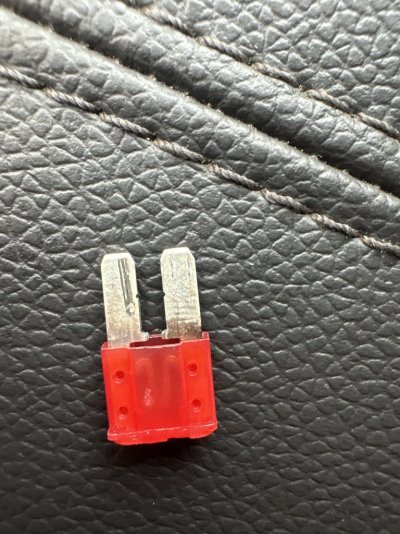
I did change the fuse for the center USB’s. Even though it was still charging, thought it was worth a try. The old fuse looked a little fried to me, but not sure if that’s normal. This didn’t fix anything either.

This is so frustrating…
 

Attachments

  • image.jpg
    image.jpg
    197 KB · Views: 4

Chevy Ecotec

Member
Joined
Feb 16, 2026
Messages
48
Reaction score
32
Location
North Carolina
I can definitely understand the frustration. My wife had a similar issue but with Android Auto not working. I forget which one she said worked, but it wasn't #3 because I would have been the one to pull the battery cable. It certainly can't hurt to reset the entire vehicle.

How many different cables have you tried? You could try cleaning the USB port with some rubbing alcohol, but I don't suggest doing that when it has power.
 

Members online

Top